Saturday, June 13, 2015
iPhone Air Concept Features 17 Larger Display but the Device Just 8 Larger Video

I wanted to keep the core design of the iPhone very much inline with what customers expect from Apple. I have given the device the title iPhone Air because Apple has demonstrated that they think the iPhone is a mature enough device to warrant two versions (5S and 5C) and I believe more distinctive branding, much like the iPad Mini and Air will help to reinforce the two product lines.The concept video shows iPhone Air as having a 4.7-inch Sapphire Crystal display "is only 8% larger than the existing iPhone 5S, this increase is to accommodate the larger screen. Some extra space could be potentially utilised by reducing the width of the side bezels", supporting a resolution of 1920x1080, with 468 pixels-per-inch, 10MP camera, 7.0 Depth (0.6mm smaller than its predecessor), and 8A chip.
- Read also: iPhone Air Concept Promo Video
Data source: via The verge

Friday, June 12, 2015
Fund this iPhone 5 case adds second SIM card

Are you constantly having to carry around two phones, one for personal use, one for work? Do you travel internationally and routinely swap "local" SIM cards for your primary one? If youre an iPhone 5 user, theres a product in development that might make you smile.
The Digirit SIM+ case lets you carry two SIM cards in one iPhone. And not just carry them, but also switch between them using a simple software-powered toggle. Its currently looking for backers on crowd-funding site HWTrek.

Of course, traditionally its a one-SIM-at-a-time proposition. With the SIM+, you get to keep two cards loaded -- one nano-SIM, one micro-SIM. In fact, the case itself actually has an internal slot for housing a third card, though only two can be active at any given time.
Well, technically, only one can. Digirit relies on a simple SIM-switching menu for choosing the card you want to use. But in addition to basic toggling, you can set timed intervals for each card, nice if you want to use, say, one by day and another by night. Take note, however, that unless your phone is unlocked, youll be limited to cards from your current carrier.
The SIM+ measures 0.41 inch thick, only about one-tenth of an inch thicker than the iPhone 5 itself. (Its not immediately clear if the case also supports the iPhone 5S, though it should given the similar dimensions.) Current plans are to make both black and white versions of the case with your choice of a black, red, or silver middle section that serves as the SIM cover.
Now for the bad news: currently the SIM+ has exactly one backer. The developers are hoping to raise $40,000 in the next 25 days. The least expensive buy-in option is $55, which gets you a black or white case with a silver cover. Shipping adds $10.
What do you think? Is this something you could use?
Data source: via Cnet (By Rick Broida)
Origine source: HWTrek
Thursday, June 11, 2015
New iPhones Score Well with Consumer Reports but Display and Battery No Match for Android Competitors
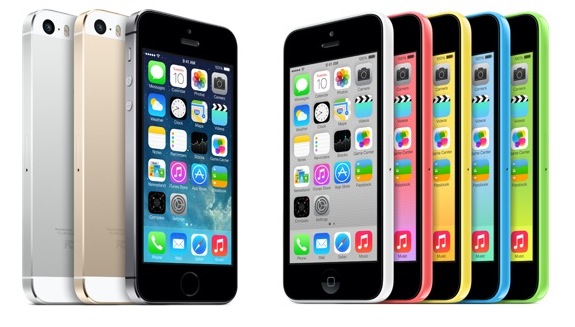
Influential ratings and review magazine Consumer Reports has reviewed Apples new iPhone 5s and iPhone 5c models, giving them high scores but calling the 4-inch Retina display and 8-10 hour battery life "no match" for Motorolas latest Droid smartphones. The full mobile phone ratings are behind the magazines paywall, but the summary blog post outlines the magazines thinking on the issue.
The iPhone 5s tops the already great iPhone 5 with a surprisingly reliable fingerprint reader, a faster processor, and better-than-ever camera. And the affordable iPhone 5c is a compelling offering for budget-minded buyers. Consumer Reports testers found both phones delivered better performances than the iPhones they succeed—they even have longer talk times (a tad less than 7 hours). [...]Many Android device manufacturers have been increasing the size of their devices and displays, pushing into so-called "phablet" territory, but Apple has so far kept to smaller displays facilitating one-handed operation. In a minor change, Apple increased the height of the iPhones display with the iPhone 5 last year, but the 4-inch display now standard on Apples latest iPhone and iPod touch models remains much smaller than seen on many competing devices.
Yet, battery life was still notably shorter than on other phones in our tests, including three of the latest Droids from Motorola, which ran for as long as 24 hours. Also, their small screens, while sharp and bright, cant beat the larger, sharper displays that adorn flagship models from Samsung, LG, and HTC.
Apple has reportedly been testing prototype iPhone designs with larger displays measuring between 4.8 and 6 inches diagonally, with a particular focus on 4.8-inch models. Apple does, however, routinely test a variety of different prototype designs and it is unclear if the company is planning to launch the larger-screen designs with the next iPhone hardware update presumably scheduled for next year.
Data source: via MacRumors (By Eric Slivka)
Tuesday, May 26, 2015
Interesting Features and Changes in Both iOS 8 Beta Updates

As we know Apple unveiling iOS 8 at its WWDC, the new operating system comes with a range of new features, like a Health app, Handoff, Family Sharing, and improvements to several apps like Messages, Siri, Mail, Safari. it is also opened many capabilities to developers.
Apple usually highlights to what could be consider as main features, while many features and changes have being discovered and noticed by users, iOS 8 contains a huge number of changes, but we will concentrate on the more interesting changes, this will include the first and the second beta of iOS 8.
Share sheet customizations

image source.
If you want to share an image, website, or other type of media, in iOS 8 you can now customize these sharing options, so you can add others elements or rearrange the sharing list, this also applies on the media options like Copy, Print, and AirPlay.
Request Desktop Site

DuckDuckGo
One of the search engines that is known for its anti-tracking stance, DuckDuckGo, in iOS 8 you can choose it as default search on Safari.iBooks
iBooks now built in iOS 8 instead to download it from the App Store. Theres also a new automatic night mode in iBooks, and an organization option to group books from a series together.Photos App
Recover deleted photos

Photos app has known a number of improvements, like iCloud Photo Library, smart adjustments. in addition to that, the Photos app in iOS 8 has also received some organizational options, so is include two albums for "Recently Added" and "Recently Deleted." The Recently Deleted section gives you the ability to recover the recent deleted photos in case you’ve deleted them accidentally.
Other tiny addition, the date and time a photo was taken is also displayed.
Hide Photos

You can now in iOS 8 to hide images in the Photos app from the Moments, Collections, and Years view, that happen when you hold a finger on a photo, to appear a pop-up, select "Hide" and confirm, will keep it from being visible in those sections, while still visible in the albums view.
Insert your photos in the Notes app

You can now insert the photos that be existing in the Photos app in Notes app.
Wi-Fi Calling

iOS 8 will include an option that will let you to make calls from Wi-Fi networks instead of cellular, these lead to saving minutes and battery performance would be better. T-Mobile has already promised to support iOS 8s Wi-Fi calling feature when it rolls out later this year.
Accessibility
Grayscale mode

You can now in iOS 8 to shift at once the entire operating system appearance into shades of black and white, that through Grayscale mode, under Accessibility.
There are others new Accessibility options:

Each device connects to the web has a unique MAC address, -iPhones among these devices,- In addition to its technical role many companies and individuals, exploit MAC addresses for their own purposes, such as to track and locate those devices, now iOS devices with iOS 8 will creat the MAC addresses randomly and locally administered, "may not always be the devices real (universal) address."
- Improved zoom
- Braille keyboard
- Alex voice
- Multi-device support for MFi hearing aids
- Guided Access improved with option for time limits, countdown timer and Touch ID support
Randomized MAC addresses
Preventing background location informations

There are many apps processes were done in the background, these processes might deplete the devices capabilities, and users might dont wish to services that are provided from those processes, especially if this service will fatigue the battery. location information included in what we have being mentioned, and many apps required that. Now in iOS 8 you will get a pop-up notify you of apps that access Location information while running in the background. Thus you can allow or prevent them, as well giving users more information on apps that could potentially be using a lot of battery life. There are also more Location Services options per app and from iPhones Settings.
Indoor positioning

In iOS 8, Apple will still be using Cellular, GPS, and WiFi to get you to the venue, but once you’re approaching a location that is enabled for indoor positioning, it will scan over wifi, tap into the device’s sensors like the M7 chip and provide accurate data of exactly where you are and how fast you’re moving through the floor plan.
New "Buy" button on Control Center

iOS 8 beta 2
As has been mentioned iOS 8 beta 2 also contains several tweaks.
Podcasts: After iBook now Podcasts app in beta 2 comes pre-installed, that means you dont need to download it from the App Store, and also it can no longer be deleted.

Podcasts has also bring a new welcome screen detailing new features in the app

image source.
Safari: The ads that redirecting users to the App Store without user interaction, Safari will now block them.
Safari now will offer a new introduction screen for Private Browsing.

image source.
App Store Purchases: Apps in the App Stores purchased tab in iOS 8 beta 1 were stored alphabetically, but now again sorted by purchase date. Its also possible to leave reviews in the App Store, in beta 1 the feature was unavailable, might due to a bug. The App Store now shown Family Purchases.

Messages: Camera and Microphone icons have changed from blue to grey, and theres a new setting to mark all messages read.

Settings: Theres a new "Raise to Listen" option for Messages.
Home Data: There’s a new Home Data section within the Privacy from the Setting menu, thatll list apps that access your Home Data.

iCloud Photos: A new "iCloud Photos" welcome screen will pop when you entering the Photos app. The new iCloud Photos feature will replacing the existing Photo Stream.

Photos app: The Photos app in iOS 8 beta has brought two new albums, Bursts photos and Slo-Mo videos, this will make browsing of those albums contents very easy.
Assistive Touch: In iOS 8 beta 2 Assistive Touch menu has new options for Control Center and Notification Center.
Assistive Touch: In iOS 8 beta 2 Assistive Touch menu has new options for Control Center and Notification Center.

image source.
Allow Notifications: Now you can mute all notifications from a specific app, that through a new "Allow Notifications" setting, the option is available for each app. While in the past, there was only an option to disallow apps from displaying notifications in Notification Center.

Battery Usage by App: iOS 8 now lets you to know how much consume each app of battery, through a new "Battery Usage" setting. In beta 2 there is a new addition lets you know the battery usage when there was no cell coverage.

The public release of iOS 8 is expected to be in the fall, as we have seen there are several new features and changes, and iOS 8 beta 2 also has brought some changes, to get to the gold iOS 8 version, based on past history, we will see others betas.
The public release of iOS 8 is expected to be in the fall, as we have seen there are several new features and changes, and iOS 8 beta 2 also has brought some changes, to get to the gold iOS 8 version, based on past history, we will see others betas.
Source: via MacRumors and others
- Photos App in iOS 8
- A List of User Interface Changes in iOS 8 Beta 3
- iOS 8 Features
- Take a Look of Some Hidden Features in iOS 8 (Video)
- iOS 8 Brings New Option "Send Last Location" To Find My iPhone or iPad
- A Comprehensive List of Changes in iOS 8 Beta 4
Monday, May 25, 2015
Gorgeous iOS 8 Concept Merging Multitasking with Control Center Video

last week a new iOS 8 "Mission Control" concept designed by Bill Labus, that imagines how the multitasking switcher and Control Center could be merged, with a simple swipe up from bottom gesture to bring it up.
- As mentioned before, flicking up from the bottom of the edge allows the multitasking app views to be tied directly to the gesture, which allows for direct manipulation and avoids having to wait for a passive animation to complete before interacting with them.
- The obvious potential drawback to this combined approach is that there is less room available for Control Center- I personally find that I use a couple features of Control Center, but almost never touch at least half of them (calculator, clock, airplane mode, bluetooth). I cant be sure, but I suspect this is true for a large amount of other users as well, so my solution is to have 5 button slots that can be customized with the 5 most used shortcut functions for that particular user.
- The brightness slider is also omitted for lack of space, however I think it could perhaps replace the volume slider, as I personally control my phones volume with the hard keys 100% of the time.
- Read also: This Is Without a Doubt What iOS 8 Should Look Like
Source: dribbble
Sunday, May 24, 2015
A7 Processor Manufactured by Samsung M7 is Standalone Processor From NXP
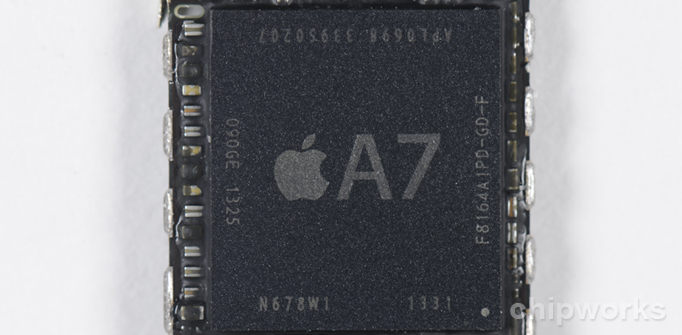
Chipworks is performing a more in-depth examination of the iPhone 5s than the one performed by iFixit last night.
Among its discoveries, Chipworks found that the A7 chip is manufactured by Samsung, a big win for that firm after rumors surfaced earlier this year that Taiwan Semiconductor Company (TSMC) might win the contract for the new chip. Code discovered in iOS 7 back in July did suggest that Samsung would remain the primary manufacturer for the A7.
Chipworks also found what it believes to be the M7 motion coprocessor, which iFixit dubbed the "magical" chip because it couldnt be found on the logic board during the original teardown. Instead, the M7 is a discrete processor from NXP:
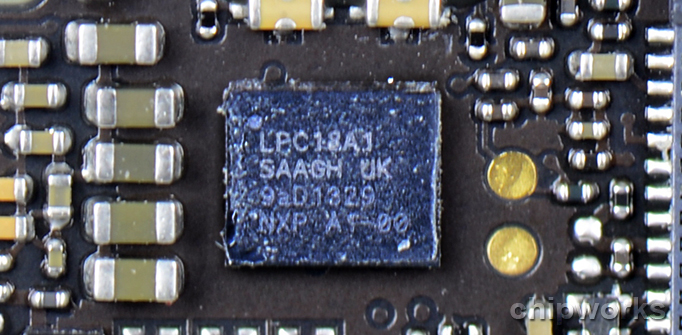
Luckily, we’ve been able to locate the M7 in the form the NXP LPC18A1. The LPC1800 series are high-performing Cortx-M3 based microcontrollers. This represents a big win for NXP. We had anticipated the M7 to be an NXP device based on input from industry analysts and our partners and we are happy to see this to be the case.
The M7 is dedicated to processing and translating the inputs provided to it by the discrete sensors; the gyroscope, accelerometer and electro magnetic compass mounted throughout the main printed circuit board. Traditional Apple techniques lead us to believe that the these discrete sensors will most likely be STMicroelectronics for the accelerometer and the gyroscope while the electro magnetic compass would again be an Asahi Kasei Microdevices (AKM). We have since confirmed the compass to be AKM’s AK8963.
Chipworks will be continuing its teardown throughout the day.
Data source: via MacRumors (By Jordan Golson)
Saturday, May 23, 2015
Evasi0n iOS 7 Jailbreak Controversy Surrounding Piracy and Chinese Partnership

Following Freemans comments, two tweets by developer i0n1c claims that the Chinese company Taig paid the Evad3rs development team "a big pile of money" to release the jailbreak in order to bundle its app store onto devices.
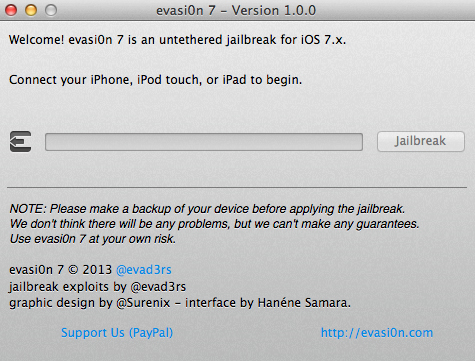
Now, the Evad3rs development team behind the jailbreak has posted an open letter to the jailbreak community on its website, trying to address the various concerns surrounding the method and emphasizing the safety and security of its users.
The team admitted that it was indeed approached by a company with an offer to include Taig with the jailbreak in China, feeling that it was "well-suited to meet the needs of users for the Chinese market." The team also notes that users are not locked into Taig, with the program giving users given the ability to uninstall the Chinese app store and install Cydia.
Also addressed was the speculation concerning the possible disclosure of exploits and methods to Taig:
The team admitted that it was indeed approached by a company with an offer to include Taig with the jailbreak in China, feeling that it was "well-suited to meet the needs of users for the Chinese market." The team also notes that users are not locked into Taig, with the program giving users given the ability to uninstall the Chinese app store and install Cydia.
Also addressed was the speculation concerning the possible disclosure of exploits and methods to Taig:
Taig has never asked us to disclose our exploits to them, let alone sell them. We were simply asked to bundle their third-party app store in China in a similar way we bundle and distribute Cydia around the world as an additional App Store, and in a similar way to how previous jailbreaks like blackra1n have bundled non-Cydia stores.
Furthermore, the developers also claim that they were unaware that Taig contained pirated apps upon access, and say they are removing instances of piracy and that Taig had contractually agreed not to serve pirated apps. They say they "will continue to monitor this issue and work to resolve it completely" and that Taig will be removed if it cant be resolved.
Currently, Evasi0n is available for OS X and Windows as an untethered jailbreak.
Data source: via MacRumors (By Richard Padilla)
Subscribe to:
Comments (Atom)