Saturday, April 4, 2015
Sony Unveils PS4 Remote Play for Xperia Z3 Family of Smartphones Tablets

Sony launched three smartphones and a tablet at its pre-IFA 2014 event in Berlin on Wednesday. The firm also introduced its PS4 Remote Play feature in for the Xperia Z3 family of devices - the Xperia Z3, Xperia Z3 Compact and Xperia Z3 Tablet Compact.
(Also See: Sony Launches Xperia Z3 Tablet Compact With 8-Inch Full-HD Display)
The PS4 Remote Play feature allows users to stream their PS4 games onto compatible Xperia devices over their home Wi-Fi network (or even a high-speed Internet connection, though Sony doesnt recommend this). This functionality will only be rolled out in November. A DualShock 4 Wireless Controller, PlayStation 4 console with the latest PS4 system software update, Sony Entertainment Network access, and the PS4 Remote Play app or PlayStation app installed on the Xperia will be required to play games.
Sony notes that some games do not support the PS4 Remote Play feature. The company has also introduced the GCM10 Game Control Mount, which will essentially make it easier for users to play PS4 games on their Xperia Z3 family of devices - by holding the tablet or smartphone along with the controller while gaming.
The company also notes that if users of the Xperia Z3 family just want to watch their PS4 friends gameplay, or chat with them, apart from browsing the PlayStation Store, they will not need the DualShock 4 Wireless Controller. Sony has also mentioned that it is currently not planning to bring the PS4 Remote Play feature to its other smartphone or tablet devices, speaking to The Verge.
The PS4 Remote Play feature was first introduced as a way to boost PS4 games from the console to the PlayStation Vita handheld console in April, along with the PS4 v1.70 system software update, and the PS Vita v3.15 system software update - which included Automatic Device Registration for access to Remote Play and other second screen features.
(Also See: Sony Xperia Z3 With 2.5GHz Snapdragon 801 SoC Launched)
Sony in August had further expanded the functionality of the PS4 Remote Play feature with the PlayStation 4 v2.00 system software update last month. The feature enabled users to stream PS4 games from the console to any PlayStation TV-connected television in their home.
(Also See: Sony Xperia Z3 Compact With 4.6-Inch HD Display Launched)
Sony at its pre-IFA 2014 event also announced two new lens-style cameras - the E-mount ILCE-QX1 and DSC-QX30, which are priced at $400 (approximately Rs. 24,000) and $350 (approximately Rs. 21,000), respectively.
The company has noted that the QX30 will be available in this month, and the QX1 will be available in November at Sony retail stores and other retailers nationwide.
The Japanese consumer electronics giant also launched the budget Xperia E3 andXperia E3 Dual smartphones at the pre-IFA 2014 event.

Full Firmware Zenfone 4 A400CG WW v6 5 35 and CHT v6 5 32
How to OTA update ? (Go to settings>About>System Update>Check for Update)
How to update Manual ? Here

ZENFONE 4 firmware:
WW VERSION
Version V6.5.35(WW)
| Description | ASUS ZenFone4(T00I) software Image: V6.5.35 (Android 4.4) for WW only* Improvement: 1. Improved the accuracy of battery percentage display Steps of Update: 1.Check software version of your device** 2.Download device software and Update SOP (From “Manual” Item) 3.Only apply to same SKU update, Example: WW->WW, CN->CN, TW->TW. 4.Software update cannot transfer the software SKU and downgrade the software version. 5.Wrong SKU may cause update failure, please update the same SKU version only. *How to know the device model? Path: Settings->About-> Model number Example: ASUS_T00I **How to know the device software version? Path: Settings->About-> software information->Build number ***System upgrade may cause part of data missing, please buckup your important data before system upgrading. |
|---|
| File Size | 809.09 MBytes 2014/11/27 |
|---|---|
| Download from | Global |
ZENFONE 4 firmware:
CHT VERSION
Version V6.5.32(CHT)
| Description | ASUS ZenFone4(T00I) software Image: V6.5.32 (Android 4.4) for WW SKU only* Improvement: 1. Improved stability of Audio Wizard feature Steps of Update: 1.Check software version of your device** 2.Download device software and Update SOP (From “Manual” Item) 3.Only apply to same SKU update, Example: WW->WW, CN->CN, TW->TW. 4.Software update cannot transfer the software SKU and downgrade the software version. 5.Wrong SKU may cause update failure, please update the same SKU version only. *How to know the device model? Path: Settings->About-> Model number Example: ASUS_T00I **How to know the device software version? Path: Settings->About-> software information->Build number ***System upgrade may cause part of data missing, please buckup your important data before system upgrading. |
|---|
| File Size | 803.57 MBytes 2014/11/07 |
|---|---|
| Download from | Global |
HTC Windows Phone 8S

The device is pretty light at just 113 grams. The hardware doesn’t shoot for the stars - instead it caters to budget minded consumers. We have a 4-inch WVGA (that’s 480 x 800 pixels) screen, a Snapdragon S4 chip with a 1.0GHz dual-core Krait processor, 512MB of RAM and 4GB of internal storage that you can expand via microSD cards. There is a removable panel at the bottom where HTC has placed the micro SIM and microSD card slots.
The battery is not removable, though. HTC is including Beats Audio technology on this device to manage to differentiate itself in the Windows Phone arena. At the back, we have a 5-megapixel camera with f/2.8 aperture, recording videos at 720p. One sore omission is a front facing camera, so there is no easy way to make video calls and make use of the built in Skype client.
Zenfone Camera Effects pencil cartoon miniature
Camera - Effects (pencil / cartoon / miniature)
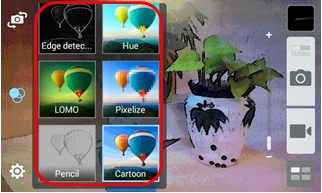
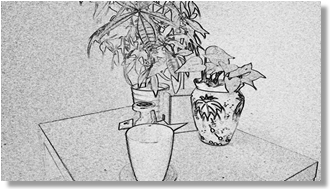
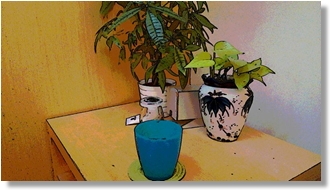
There are 10 kinds of camera effects. You can apply effects before taking each photo.
Steps
1. Tap on "Camera"
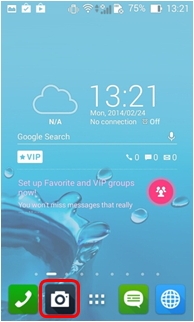
2. Tap on the Effects icon.
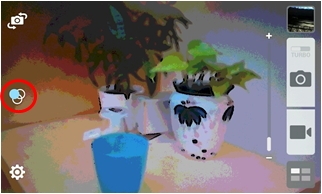
3. Select the photo effect you would like to apply.
4. Then point the camera at the subject, and touch the camera shutter button.
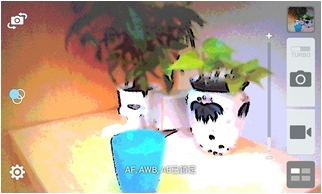
5. To complete photo shoot.
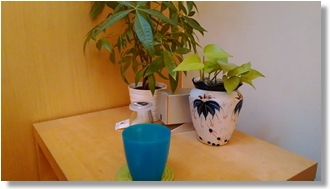
Normal shot (no effects)
Pencil effect
Cartoon effect
Toshiba Chromebook 2 Release Date 2015
Toshiba Chromebook 2 Review: Impressive Chromebook for that cost
Toshiba Chromebook 2 Release Date 2015-The Good The actual Toshiba Chromebook 2 Review UK has an excellent 1080p monitor, good Chrome OS performance and a nice feature established including a full-size SDXC minute card slot, fast 802. 11ac instant and great-sounding loudspeakers. The Bad Quality, particularly the top, feels a bit flimsy. Battery life in your benchmarks, while very good, fell short connected with competing models. The Bottom Line If thinking of an all-around reliable Chrome OS knowledge -- with among the finest screens weve seen with a Chromebook -- this Toshiba Chromebook 2 needs to be your starting level.
.jpg "Toshiba Chromebook 2") |
Toshiba Chromebook 2 Release Date |
A big section of the appeal of Chromebooks is actually their prices, which typically dont rise above the $300 or even £300 mark. Low prices generally dont equal great build excellent or design, even though, something Toshiba improved on using its second go-round, this aptly named Chromebook 3.
Toshibas first Chromebook looked adequate, but because the item had a 13. 3-inch monitor, it was bulkier versus 11. 6-inch models it absolutely was competing against. To the 2, Toshiba shaved off as much as possible so it is closer in space to those smaller-screen Chromebooks while keeping the 13. 3-inch monitor.
The result is actually more screen to cooperate with and a more spacious keyboard in order to type on, but without occupying a lot of more room as part of your bag.
Toshibas Chromebook 2 pre order is available in an entry-level $250 model (£200) with a 1, 366x768-pixel resolution or possibly a $330 (£250, AU$449) premium version with a full-HD display utilising an IPS panel pertaining to better off-angle observing. We tested this 1080p model along with the display is great and totally worth the other cash.
Layout and features
Toshiba shaving down the dimensions of the notebook is actually pretty great, but the appear and feel of the Chromebook 3 overall isnt anything special.
The silver-colored is covered in some sort of textured resin that we personally do not like the feel connected with. Plus, the lid offers some flex into it and doesnt look like itll offer a lot of protection for the screen on the inside. However, Toshiba offers recommended snap-on covers due to this model that need to toughen it upward a bit together with smooth out the finale.
If you were contemplating going with a smaller Chromebook to save lots of some travel area, it might not be worth the cost. For example, Samsungs 11. 6-inch Chromebook 3 measures 11. some inches wide by simply 8 inches deeply by 0. 7 ins thick (29x20x2cm) as well as weighs 2. 7 weight (1. 2kg). Toshibas Chromebook 3 measures 12. 6 ins wide by 8. some inches deep by simply 0. 8 inches heavy (32x21x2cm) and also comes in at 3 weight (1. 3kg).
That extra screen space is absolutely nice to have after you start opening Opera apps or a number of windows. And the monitor itself is fantastic compared to what were employed to seeing. The colors as well as viewing angles connected with displays on fighting models look sad by comparison. Pictures and videos pop within this Toshiba and textual content looks sharp. And its a bright show (340 nits) way too, which comes throughout handy when dealing with glare.
The top opens about 135 diplomas. I only talk about this because I stumbled upon myself occasionally seeking to push it beyond that to defeat glare over shiny screen and discover a comfortable working angle by it on my lap. In general, even though, it doesnt pose an issue.
Also, the higher decision might squinting more to see whats on monitor, but the decision is easily tweaked. Click on this settings box in the lower right corner in the screen and then simply click Internal Display. From there you can drop the decision, which will enlarge whatever you see. It will always make things look fuzzier the low you go, so for observing pictures and video youll likely want to keep it at 1, 920x1, 080 pixels.
Adding for your media enjoyment will be the stereo speakers tuned by simply headphone-maker Skullcandy that turn up through the key pad. Generally speaking, branded audio capabilities like this are typically a letdown, but this stuff sound really good even when cranked up.
Another benefit for the slightly larger is that theres more room for that keyboard and touchpad. The keyboard is a comfortable size, though there is not much travel for the keys and theyre for the soft side, which made the keying experience feel slower. Your mileage may vary, of course. It is usually not backlit, although thats typical.
The actual touchpad is significant, responsive and facilitates multitouch gestures. I tend to drag my arms when typing as well as experienced no cursor jumpiness on account of it. The surface gives you a slight texture to hold your finger ideas gliding smoothly.
Rounding out this features are a HD webcam with a dual-mic array; just one USB 3. 0 the other USB 2. 0 slot; a full-size HDMI output; a headphone/mic jack port; an SD/SDHC/SDXC minute card slot supporting cards nearly 2TB; and 802. 11ac Wi-Fi as well as Bluetooth 4. 0.
Performance as well as battery life
It doesnt take much to run Chrome OS, something more important that helps keep Chromebooks inexpensive. To the Chromebook 2, you will get a newer, better-than-Atom dual-core 3. 58GHz Intel Celeron N2840 brand, 4GB of memory (2GB when you go with this lower-resolution version) as well as 16GB of adobe flash storage (100GB connected with Google Drive cloud storage is included as well).
The 4GB connected with memory does could have some help, seen both in your benchmarks and anecdotal make use of. Video playback -- streamed as well as stored locally -- seemed to be smoother than Ive experienced on designs with 2GB connected with memory and controlling multiple windows along with several tabs open didnt cause a sluggish experience.
Simple photo editing using Pixlr Effect Up or Polarr or playing a rapid game of Lower the Rope just werent issues, either. However, this is no gaming console and if you believe youll need greater graphics performance, think about the Acer Chromebook 13. Otherwise, the Intel HIGH DEFINITION graphics are adequate for most toshiba chromebook 2 actions.
For battery life, Toshiba claims nearly 11. 5 hours connected with battery life for the 1, 366x768-resolution model or more to 9 hours for the 1, 920x1, 080-resolution product we tested. Those times derive from results from Googles power-testing treatments.
Using our steady wireless video-streaming analyze with sound as well as screen brightness established to 50 per cent, we hit 5 time and 57 mins, which is a large gap. However, to comprehend typical everyday use of it, I had no worries breaking the 7-hour level before feeling the call to plug in.
OPPO First CyanogenMod Inc Partner

The founder of CyanogenMod, Steve Kondik who is acting as Chief Technology Officer of his own company just posted a video saying that he will attend the OPPO N1 launching event in Beijing on September, 23rd which is next Monday.
Basically, it is as good as an official announcement of the very first hardware partner of CyanogenMod Inc.
Samsung Galaxy S5 Revealed

After numerous leaks, the next iteration of the Galaxy S series is finally official. The new Samsung Galaxy S5, announed at this years MWC event in Barcelona, is a relatively conservative upgrade to the Galaxy S4, and doesnt bring some of the huge improvements that many leaks were suggesting, like a 64-bit CPU and a 2K screen. So instead of bringing something brand new to the market, the Galaxy S5 rather seeks to improve upon its predecessors.
Actually, my biggest gripe with the Galaxy S5 has to do with its design. On the bright side, Samsung did ditch the glossy plastic used in the Galaxy S4 and S3, in favor of a faux-leather texture., which is still plastic nevertheless However, instead of molding the plastic to look like leather, like in the Note 3, The S5s plastic back has what looks like perforated holes, not unlike what was on the back of the 2012 Nexus 7. While it definitely looks less cheap than the glossy plastic, its still far from looking premium and attractive. Even a simple, matte-finished plastic back like the one on the Nexus 5 or Moto G is more inviting than the S5s textured plastic design. The Galaxy S5 will be available in four colors at launch: a rather standard black and white, and two unusual colors, blue and gold.
The front face of the phone remains similar to the Galaxy S4, except that the sides are a bit less rounded, like with the Note 3. The only real difference is that the Menu key has been replaced with a Task Switcher key, the Menu button now being displayed on the UI.
The Galaxy S5 is significantly larger than the Galaxy S4, despite only a 0.1" increase in screen size. It measures 142mm tall, 72.5mm wide and 8.1mm thick, and weighs 145g. In comparison, the Galaxy S4 measures 136.6 x 70 x 7.9mm and weighs 130g. The main culprit for the S5s larger footprint is probably the IP67 certification, which is why Id like to see Samsung release a non-waterproof version of the Galaxy S5, which a smaller, lighter body, perhaps (finally) with a metal construction. In any case, the Galaxy S5 isnt too big nor too heavy. In comparison to another ~5" smartphone with an IP certification, the Sony Xperia Z2, the Galaxy S5 is comparatively smaller and much lighter.
The display is, on paper, almost identical to the one on the Galaxy S4. Screen size has increased only mildly to 5.1", while the resolution was kept at 1080p, resulting in a 432ppi pixel density. While that is lower than the S4s 441ppi (due to the smaller screen), the difference between 441ppi and 432ppi is impossible to notice, even with a microscope. Many rumors pointed to a 2K screen in the Galaxy S5, but I was actually very happy too see Samsung didnt make that move. A 2K screen would require too much power and GPU resources, not to mention that, at this screen size, the difference between 2K and 1080p wouldnt be very noticeable. Maybe in one or two years, when batteries will be larger and GPUs, more powerful, it might make sense to move up to 2K in smartphones, but for now its a no go, in my opinion. The screen technology employed is AMOLED, of course, and there should be some improvements to the technology regarding brightness output and color reproduction compared to the Galaxy S4.
So the Galaxy S5s screen isnt very different from the S4, but then again the S4s display is as good as smartphones should go for now, and the improvements to the AMOLED technology help make the S5s display at least slightly superior to the S4.
The processor in the Galaxy S5 is a Snapdragon 801, which offers comparatively much more power than the original Galaxy S4s Snapdragon 600 processor. The 801 is, however, very similar to the Snapdragon 800 processor found on the LTE-A variant of the Galaxy S4, which released towards the end of 2013. The Snapdragon 801 boasts of four Krait 400 cores running at up to 2.5GHz, an Adreno 330 GPU with an unprecedented clock speed of 578MHz, and a 64-bit wide LPDDR3 memory interface at 933MHz. The Snapdragon 801 may not be a huge step up from the 800, but that doesnt mean its not the most powerful SoC to date. Alas, the Snapdragon 800 already went neck to neck with the Apple A7 in some benchmarks, and outperformed it in others, so the Snapdragon 801 will only guarantee that Qualcomm retains the title of the manufacturer with the fastest SoC in existence. To put it shortly, the Galaxy S5 boasts of the best performance available in the mobile world.
The Galaxy S5 packs 2 GB of RAM, just like last years model. I expected this years S-flagship to pack 3 GB of RAM like the Note 3, but I assume that Samsung decided 2 GB was enough for the tasks the Galaxy S5 will undertake, and frankly I agree, especially since the S5 runs Android KitKat out of the box. The Galaxy S5s battery also got bigger compared to the S4, but not by much. The difference is only 200mAh, making the Galaxy S5s battery a 2,800mAh unit. Given that the screen size and resolution are very similar to the Galaxy S4s, the overall system power consumption shouldnt increase too much with the S5, so even the mild increase in battery size will probably help increase the battery life of the smartphone.
The Galaxy S5 continues the trend of continuously improving camera quality, packing a 16MP rear shooter. Aperture remains at F/2.2, and the new camera module makes use of ISOCELL technology, which means theres more separation between each pixel and improves on image resolution and increases the dynamic range. One feature which was ported over from the Note 3 is 4K video recording at 30FPS. We still dont have image and video samples for the Galaxy S5, but Im confident that image quality will be significantly improved over the Galaxy S4. The front-facing camera is a 2 MP unit capable of 1080p video recording.
Until now I only talked about improvements over the Galaxy S4, but what brand new features does the Galaxy S5 add? Firstly, theres a brand new take on smartphone fitness features with a heart rate monitor, which is located next to the LED flash. Some people will find this feature gimmicky, but I can definitely see it being useful for people who have an active lifestyle (this fits perfectly with the ruggedness of the Galaxy S5).
Also, in response to Apples Touch ID fingerprint scanner, Samsung has introduced a slightly different kind of fingerprint scanner on the S5. Instead of being on the home button, like on the iPhone 5s, the Galaxy S5s fingerprint scanner is built into the bottom-center portion of the screen, and its activated by swiping it, rather than holding it. Its not as convenient as Apples solution, but its still very good nevertheless.
Subscribe to:
Comments (Atom)