Saturday, June 13, 2015

iPhone Air Concept Features 17 Larger Display but the Device Just 8 Larger Video


New concept video released by Sam Beckett demonstrating what an iPhone Air might look like.
I wanted to keep the core design of the iPhone very much inline with what customers expect from Apple. I have given the device the title iPhone Air because Apple has demonstrated that they think the iPhone is a mature enough device to warrant two versions (5S and 5C) and I believe more distinctive branding, much like the iPad Mini and Air will help to reinforce the two product lines.
The concept video shows iPhone Air as having a 4.7-inch Sapphire Crystal display "is only 8% larger than the existing iPhone 5S, this increase is to accommodate the larger screen. Some extra space could be potentially utilised by reducing the width of the side bezels", supporting a resolution of 1920x1080, with 468 pixels-per-inch, 10MP camera, 7.0 Depth (0.6mm smaller than its predecessor), and 8A chip.


  • Read also: iPhone Air Concept Promo Video


Data source: via The verge

Friday, June 12, 2015

Fund this iPhone 5 case adds second SIM card


Are you constantly having to carry around two phones, one for personal use, one for work? Do you travel internationally and routinely swap "local" SIM cards for your primary one? If youre an iPhone 5 user, theres a product in development that might make you smile.

The Digirit SIM+ case lets you carry two SIM cards in one iPhone. And not just carry them, but also switch between them using a simple software-powered toggle. Its currently looking for backers on crowd-funding site HWTrek.

iPhones that run on GSM networks (notably those from AT&T and T-Mobile here in the US) employ SIM cards to establish network connectivity. Those cards can be removed as needed if youre traveling overseas, want a temporary different phone number, or just want to switch to a lower-cost carrier.

Of course, traditionally its a one-SIM-at-a-time proposition. With the SIM+, you get to keep two cards loaded -- one nano-SIM, one micro-SIM. In fact, the case itself actually has an internal slot for housing a third card, though only two can be active at any given time.

Well, technically, only one can. Digirit relies on a simple SIM-switching menu for choosing the card you want to use. But in addition to basic toggling, you can set timed intervals for each card, nice if you want to use, say, one by day and another by night. Take note, however, that unless your phone is unlocked, youll be limited to cards from your current carrier.

The SIM+ measures 0.41 inch thick, only about one-tenth of an inch thicker than the iPhone 5 itself. (Its not immediately clear if the case also supports the iPhone 5S, though it should given the similar dimensions.) Current plans are to make both black and white versions of the case with your choice of a black, red, or silver middle section that serves as the SIM cover.

Now for the bad news: currently the SIM+ has exactly one backer. The developers are hoping to raise $40,000 in the next 25 days. The least expensive buy-in option is $55, which gets you a black or white case with a silver cover. Shipping adds $10.

What do you think? Is this something you could use?


Data source: via Cnet (By Rick Broida)
Origine source: HWTrek

Thursday, June 11, 2015

New iPhones Score Well with Consumer Reports but Display and Battery No Match for Android Competitors


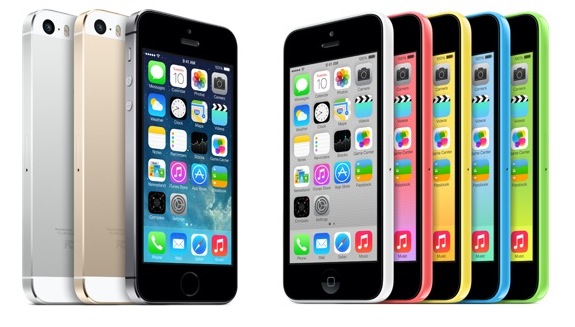
Influential ratings and review magazine Consumer Reports has reviewed Apples new iPhone 5s and iPhone 5c models, giving them high scores but calling the 4-inch Retina display and 8-10 hour battery life "no match" for Motorolas latest Droid smartphones.
The full mobile phone ratings are behind the magazines paywall, but the summary blog post outlines the magazines thinking on the issue.
The iPhone 5s tops the already great iPhone 5 with a surprisingly reliable fingerprint reader, a faster processor, and better-than-ever camera. And the affordable iPhone 5c is a compelling offering for budget-minded buyers. Consumer Reports testers found both phones delivered better performances than the iPhones they succeed—they even have longer talk times (a tad less than 7 hours). [...]

Yet, battery life was still notably shorter than on other phones in our tests, including three of the latest Droids from Motorola, which ran for as long as 24 hours. Also, their small screens, while sharp and bright, cant beat the larger, sharper displays that adorn flagship models from Samsung, LG, and HTC.
Many Android device manufacturers have been increasing the size of their devices and displays, pushing into so-called "phablet" territory, but Apple has so far kept to smaller displays facilitating one-handed operation. In a minor change, Apple increased the height of the iPhones display with the iPhone 5 last year, but the 4-inch display now standard on Apples latest iPhone and iPod touch models remains much smaller than seen on many competing devices.

Apple has reportedly been testing prototype iPhone designs with larger displays measuring between 4.8 and 6 inches diagonally, with a particular focus on 4.8-inch models. Apple does, however, routinely test a variety of different prototype designs and it is unclear if the company is planning to launch the larger-screen designs with the next iPhone hardware update presumably scheduled for next year.


Data source: via MacRumors (By Eric Slivka)

Tuesday, May 26, 2015

Interesting Features and Changes in Both iOS 8 Beta Updates


As we know Apple unveiling iOS 8 at its WWDC, the new operating system comes with a range of new features, like a Health app, Handoff, Family Sharing, and improvements to several apps like Messages, Siri, Mail, Safari. it is also opened many capabilities to developers.


Apple usually highlights to what could be consider as main features, while many features and changes have being discovered and noticed by users, iOS 8 contains a huge number of changes, but we will concentrate on the more interesting changes, this will include the first and the second beta of iOS 8.


Share sheet customizations


image source.

If you want to share an image, website, or other type of media, in iOS 8 you can now customize these sharing options, so you can add others elements or rearrange the sharing list, this also applies on the media options like Copy, Print, and AirPlay. 

Request Desktop Site


Safari in iOS 8 includes an option "Request Desktop Site" that allowing you to load a desktop style of a website rather than the mobile style.

DuckDuckGo

One of the search engines that is known for its anti-tracking stance, DuckDuckGo, in iOS 8 you can choose it as default search on Safari.


iBooks

iBooks now built in iOS 8 instead to download it from the App Store. Theres also a new automatic night mode in iBooks, and an organization option to group books from a series together.

Photos App


Recover deleted photos


Photos app has known a number of improvements, like iCloud Photo Library, smart adjustments. in addition to that, the Photos app in iOS 8 has also received some organizational options, so is include two albums for "Recently Added" and "Recently Deleted." The Recently Deleted section gives you the ability to recover the recent deleted photos in case you’ve deleted them accidentally.


Other tiny addition, the date and time a photo was taken is also displayed. 


Hide Photos


You can now in iOS 8 to hide images in the Photos app from the Moments, Collections, and Years view, that happen when you hold a finger on a photo, to appear a pop-up, select "Hide" and confirm, will keep it from being visible in those sections, while still visible in the albums view.


Insert your photos in the Notes app


You can now insert the photos that be existing in the Photos app in Notes app.


Wi-Fi Calling


iOS 8 will include an option that will let you to make calls from Wi-Fi networks instead of cellular, these lead to saving minutes and battery performance would be better. T-Mobile has already promised to support iOS 8s Wi-Fi calling feature when it rolls out later this year.

Accessibility


Grayscale mode


You can now in iOS 8 to shift at once the entire operating system appearance into shades of black and white, that through Grayscale mode, under Accessibility.


There are others new Accessibility options:
  • Improved zoom 
  • Braille keyboard
  • Alex voice
  • Multi-device support for MFi hearing aids
  • Guided Access improved with option for time limits, countdown timer and Touch ID support

    Randomized MAC addresses


    Each device connects to the web has a unique MAC address, -iPhones among these devices,- In addition to its technical role many companies and individuals, exploit MAC addresses for their own purposes, such as to track and locate those devices, now iOS devices with iOS 8 will creat the MAC addresses randomly and locally administered, "may not always be the devices real (universal) address."


    Preventing background location informations


    There are many apps processes were done in the background, these processes might deplete the devices capabilities, and users might dont wish to services that are provided from those processes, especially if this service will fatigue the battery. location information included in what we have being mentioned, and many apps required that. Now in iOS 8 you will get a pop-up notify you of apps that access Location information while running in the background. Thus you can allow or prevent them, as well giving users more information on apps that could potentially be using a lot of battery life. There are also more Location Services options per app and from iPhones Settings.


    Indoor positioning


    iOS 8 will include some new Core Location features that allowing venue owners to create indoor positioning systems, this process will mostly depended on the M7 processor and iPhones motion sensors.
    In iOS 8, Apple will still be using Cellular, GPS, and WiFi to get you to the venue, but once you’re approaching a location that is enabled for indoor positioning, it will scan over wifi, tap into the device’s sensors like the M7 chip and provide accurate data of exactly where you are and how fast you’re moving through the floor plan.


    New "Buy" button on Control Center


    When you play a song on iTunes Radio a "Buy" button will appear on control center.

    iOS 8 beta 2


    As has been mentioned iOS 8 beta 2 also contains several tweaks.


    Podcasts: After iBook now Podcasts app in beta 2 comes pre-installed, that means you dont need to download it from the App Store, and also it can no longer be deleted. 


    Podcasts has also bring a new welcome screen detailing new features in the app


    image source.

    Safari: The ads that redirecting users to the App Store without user interaction, Safari will now block them. 


    Safari now will offer a new introduction screen for Private Browsing.


    image source.

    App Store Purchases: Apps in the App Stores purchased tab in iOS 8 beta 1 were stored alphabetically, but now again sorted by purchase date. Its also possible to leave reviews in the App Store, in beta 1 the feature was unavailable, might due to a bug. The App Store now shown Family Purchases.


    QuickType: Apples QuickType keyboard is now available on the iPad as well.

    Brightness: The brightness slider under Wallpaper and Brightness from Settings menu was broken in beata 1, now works again.

    Messages: Camera and Microphone icons have changed from blue to grey, and theres a new setting to mark all messages read.


    Settings: Theres a new "Raise to Listen" option for Messages.

    Home Data: There’s a new Home Data section within the Privacy from the Setting menu, thatll list apps that access your Home Data.


    iCloud Photos: A new "iCloud Photos" welcome screen will pop when you entering the Photos app. The new iCloud Photos feature will replacing the existing Photo Stream.


    Photos app: The Photos app in iOS 8 beta has brought two new albums, Bursts photos and Slo-Mo videos, this will make browsing of those albums contents very easy.

    Assistive Touch: In iOS 8 beta 2 Assistive Touch menu has new options for Control Center and Notification Center.

    image source.

    Allow Notifications: Now you can mute all notifications from a specific app, that through a new "Allow Notifications" setting, the option is available for each app. While in the past, there was only an option to disallow apps from displaying notifications in Notification Center.


    Battery Usage by App: iOS 8 now lets you to know how much consume each app of battery, through a new "Battery Usage" setting. In beta 2 there is a new addition lets you know the battery usage when there was no cell coverage.


    The public release of iOS 8 is expected to be in the fall, as we have seen there are several new features and changes, and iOS 8 beta 2 also has brought some changes, to get to the gold iOS 8 version, based on past history, we will see others betas.


    Source: via MacRumors and others


    Read also: 
    • Photos App in iOS 8
    • A List of User Interface Changes in iOS 8 Beta 3 
    • iOS 8 Features 
    • Take a Look of Some Hidden Features in iOS 8 (Video)
    • iOS 8 Brings New Option "Send Last Location" To Find My iPhone or iPad
    • A Comprehensive List of Changes in iOS 8 Beta 4

    Monday, May 25, 2015

    Gorgeous iOS 8 Concept Merging Multitasking with Control Center Video


    iOS 7 came with more than one features one of these top features Control Center, and multitasking featur also revamped completely in iOS 7.

    last week a new iOS 8 "Mission Control" concept designed by Bill Labus, that imagines how the multitasking switcher and Control Center could be merged, with a simple swipe up from bottom gesture to bring it up.
    - As mentioned before, flicking up from the bottom of the edge allows the multitasking app views to be tied directly to the gesture, which allows for direct manipulation and avoids having to wait for a passive animation to complete before interacting with them.

    - The obvious potential drawback to this combined approach is that there is less room available for Control Center- I personally find that I use a couple features of Control Center, but almost never touch at least half of them (calculator, clock, airplane mode, bluetooth). I cant be sure, but I suspect this is true for a large amount of other users as well, so my solution is to have 5 button slots that can be customized with the 5 most used shortcut functions for that particular user.
    - The brightness slider is also omitted for lack of space, however I think it could perhaps replace the volume slider, as I personally control my phones volume with the hard keys 100% of the time.

    • Read also: This Is Without a Doubt What iOS 8 Should Look Like


    Source: dribbble

    Sunday, May 24, 2015

    A7 Processor Manufactured by Samsung M7 is Standalone Processor From NXP


    Chipworks is performing a more in-depth examination of the iPhone 5s than the one performed by iFixit last night.

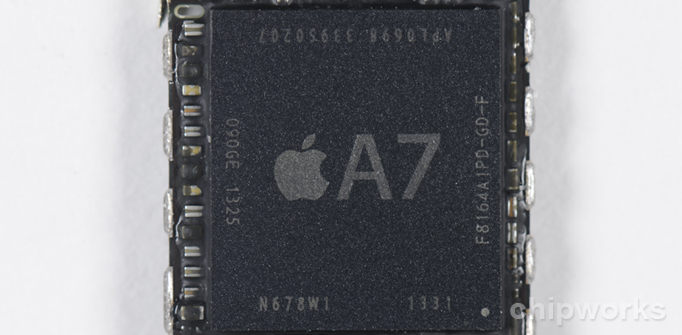
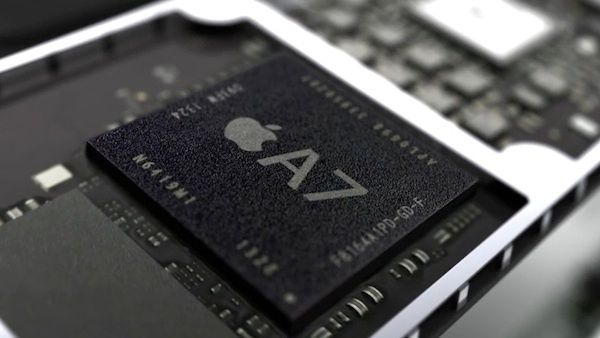
    Among its discoveries, Chipworks found that the A7 chip is manufactured by Samsung, a big win for that firm after rumors surfaced earlier this year that Taiwan Semiconductor Company (TSMC) might win the contract for the new chip. Code discovered in iOS 7 back in July did suggest that Samsung would remain the primary manufacturer for the A7.

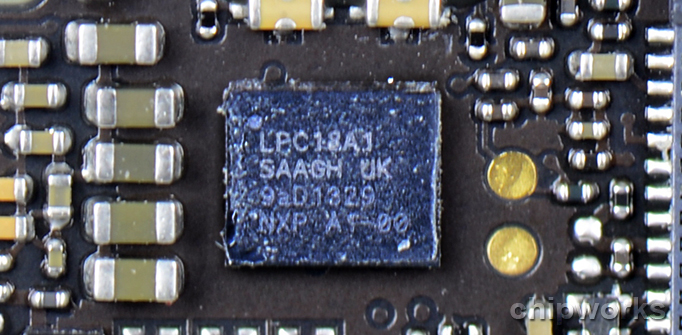
    Chipworks also found what it believes to be the M7 motion coprocessor, which iFixit dubbed the "magical" chip because it couldnt be found on the logic board during the original teardown. Instead, the M7 is a discrete processor from NXP:

    Luckily, we’ve been able to locate the M7 in the form the NXP LPC18A1. The LPC1800 series are high-performing Cortx-M3 based microcontrollers. This represents a big win for NXP. We had anticipated the M7 to be an NXP device based on input from industry analysts and our partners and we are happy to see this to be the case. 
    The M7 is dedicated to processing and translating the inputs provided to it by the discrete sensors; the gyroscope, accelerometer and electro magnetic compass mounted throughout the main printed circuit board. Traditional Apple techniques lead us to believe that the these discrete sensors will most likely be STMicroelectronics for the accelerometer and the gyroscope while the electro magnetic compass would again be an Asahi Kasei Microdevices (AKM). We have since confirmed the compass to be AKM’s AK8963.
    Chipworks will be continuing its teardown throughout the day.


    Data source: via MacRumors (By Jordan Golson)

    Saturday, May 23, 2015

    Evasi0n iOS 7 Jailbreak Controversy Surrounding Piracy and Chinese Partnership


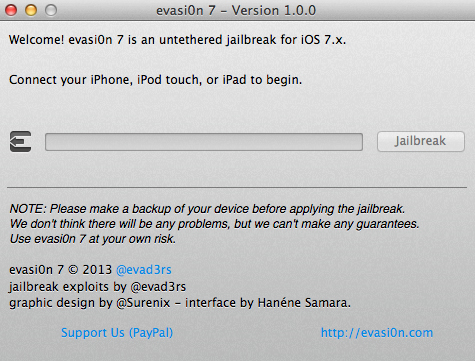
    After the Evasi0n untethered jailbreak was updated for newer iPhones, iPads, and iOS 7.x, Cydia administrator Jay Freeman noted on his Twitter that he was not informed about a new version of the jailbreak before its release. Beyond that, he also reported that the new jailbreak automatically installs a third party app store named Taigwhich distributes cracked apps in China.

    Following Freemans comments, two tweets by developer i0n1c claims that the Chinese company Taig paid the Evad3rs development team "a big pile of money" to release the jailbreak in order to bundle its app store onto devices.


    Now, the Evad3rs development team behind the jailbreak has posted an open letter to the jailbreak community on its website, trying to address the various concerns surrounding the method and emphasizing the safety and security of its users.

    The team admitted that it was indeed approached by a company with an offer to include Taig with the jailbreak in China, feeling that it was "well-suited to meet the needs of users for the Chinese market." The team also notes that users are not locked into Taig, with the program giving users given the ability to uninstall the Chinese app store and install Cydia.

    Also addressed was the speculation concerning the possible disclosure of exploits and methods to Taig:

    Taig has never asked us to disclose our exploits to them, let alone sell them. We were simply asked to bundle their third-party app store in China in a similar way we bundle and distribute Cydia around the world as an additional App Store, and in a similar way to how previous jailbreaks like blackra1n have bundled non-Cydia stores.
    Furthermore, the developers also claim that they were unaware that Taig contained pirated apps upon access, and say they are removing instances of piracy and that Taig had contractually agreed not to serve pirated apps. They say they "will continue to monitor this issue and work to resolve it completely" and that Taig will be removed if it cant be resolved.
    Currently, Evasi0n is available for OS X and Windows as an untethered jailbreak.


    Data source: via MacRumors (By Richard Padilla)

    Friday, May 22, 2015

    Apple Reportedly Launching Larger iPad in October 2014 Larger iPhone in May 2014


    Following a report last month stating that Apple supplier Quanta Computer had landed the contract to mass-produce a larger-sized iPad for late 2014, Digitimes is reporting that the 12.9-inch tablet will be released in October 2014 and will target North Americas educational market. Apple is also said to be examining the possibility of replacing the 11-inch MacBook Air with the larger iPad.
    Apples large-size tablet will be manufactured by Quanta Computer, and was originally expected to adopt either 12.9- or 13.3-inch panels, with recent rumors indicating that 12.9-inch has a better chance to be picked, the sources noted.
    The report also states that Apple is planning to release a larger size iPhone in May 2014, using a 20nm processor manufactured by Taiwan Semiconductor Manufacturing Company (TSMC). Reports of a next-generation iPhone featuring a larger screen have surfaced occasionally throughout the past year, while the claim of an A8 processor made by TSMC is follows a report in June stating that the company had struck a three-year deal with Apple to produce A-series chips starting in 2014.

    However, a May 2014 release date for the next iPhone would be somewhat of a surprising move by Apple, considering that the most recent reports have stated that the larger-screened iPhone will debut in late 2014. A release then would be in line with the October 2011 launch of the iPhone 4s, the September 2012 launch of the iPhone 5, and the September 2013 launch of the iPhone 5s and 5c.

    A report last month from The Korea Times indicated that production of a 12.9-inch Retina Display to be used in a next-generation iPad was already underway at an Apple supplier in Korea, with a target date of early 2014. The larger tablet is also said to carry an improved display nearing ultra high-definition (UHD) quality, which would be significantly bigger and contain more pixels than Apples current 9.7-inch iPad Air.


    Data source: via MacRumors (By Richard Padilla)

    Thursday, May 21, 2015

    Apple Releases New Update iOS 8 0 1 To Bugs Fixes in HealthKit Keyboards and More The Update Causing Issues Updated


    After a week of the release of iOS 8 to the public, Apple today released a new update iOS 8.0.1, which brings several bug fixes to this new operating system. The update arrives as built 12A402. 

    iOS 8.0.1 can be downloaded over the air, or though iTunes. The update contains a number of fixes for bugs found in the initial release of iOS 8. Fixes have been made to HealthKit, which prevented apps that support HealthKit from being allowed in the App Store, this probleme came to light shortly before the public launch of iOS 8.

    Addition to problems with Photo Library, data usage for SMS/MMS messages, issues with 3rd party keyboards have also been addressed, along with problems with uploading photos, videos to Safari and more.
    - Fixes a bug so HealthKit apps can now be made available on the App Store
    - Addresses an issue where 3rd party keyboards could become deselected when a user enters their passcode
    - Fixes an issue that prevented some apps from accessing photos from the Photo Library
    - Improves the reliability of the Reachability feature on the iPhone 6 and iPhone 6 Plus
    - Fixes an issue that could cause unexpected cellular data usage when receiving SMS/MMS messages
    - Better support of Ask To Buy for Family Sharing for In-App Purchases
    - Fixes an issue where ringtones were sometimes not restored from iCloud backups
    - Fixes a bug that prevented uploading photos and videos from Safari
    Apple promised customers to enable its mobile payment service Apple Pay in October, that through an update to iOS 8, that mean the second update will be likely in the coming weeks.

    Note: Many early installers have complained of this update which caused to cellular service to be disabled, so "No Service" messages after updating. There are also reports of problems with Touch ID.


    Update: it seems these issues limited to users who have an iPhone 6 or an iPhone 6 Plus. Apple has pulled iOS 8.0.1 from the Developer Center, it is also no longer available via over the air, Apple said that it was investigating the issue. Later it released a support document confirming that an iOS 8.0.2 update is in the works with a fix. 

    Wednesday, May 20, 2015

    Apple Releases the Fifth iOS 8 to Developers


    Apple today released the fifth beta of iOS 8 to developers, this version comes two week after the fourth beta, while the first unveiling of iOS 8 was at Worldwide Developers Conference, since two months, which contains a range of new features and improvement.

    iOS 8 beta 5 build 12A4345d is available via Apples over-the-air on iOS devices, the download can also be through the iOS Developer Center wedsite. Apple has also released a new beta software update to Apple TV, which includes a redesigned UI.

    Despite the iOS 8s style no differ a lot of iOS 7, but has come with a set of new features and apps like the integration with OS X, Family Sharing features, QuickType, interactive notifications, a Health app, and improvements to several apps like Messages, and Safari.

    As its predecessors, iOS 8 beta 5 also contains new features and refinements like new options for SMS Relay and new features in Health, well come to all of these changes in the next post.

    So far, iOS 8 is only available to registered developers, the public release expected to be this fall, likely alongside announcement of new iPhone versions, while there is a conflict in news, if iOS 8 beta 5 is the latest beta before the iOS 8 golden version, or well see another beta.


    Read also:
    • A Comprehensive List of Changes in iOS 8 Beta 4
    • A List of User Interface Changes in iOS 8 Beta 3
    • Interesting Features and Changes in Both iOS 8 Beta Updates 
    • Photos App in iOS 8
    • iOS 8 Features
    • iOS 8 Brings New Option "Send Last Location" To Find My iPhone or iPad

    Tuesday, May 19, 2015

    All The Changes In iOS 7 1 Beta You’ll Actually Notice


    This morning Apple released its first major beta build of iOS 7 to developers since the release of iOS 7 in September. On the surface the update seems to be just a bunch of bug fixes and performance improvements for a number of apps, but once you dig into the new software a little more there are a couple UI changes and new features that we’ve found.


    Here are the new changes to iOS 7.1 that you might actually notice:


    Dark Keyboard

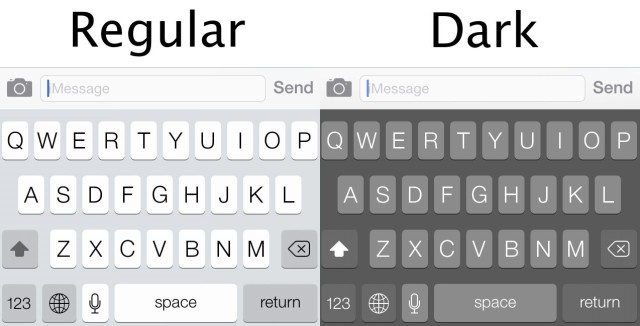
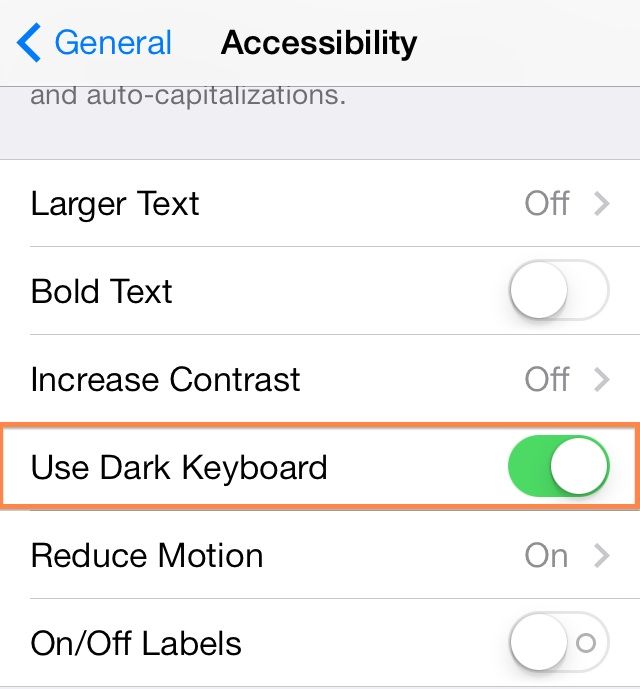
    iOS 7 is flat and white all over but a few apps like Tweetbot 3.0 have taken advantage of Apple’s dark keyboard to give their apps more variation. With the iOS 7.1 beta users can finally switch to the dark keyboard permanently under the Accessibility Settings


    Improved Contrasts

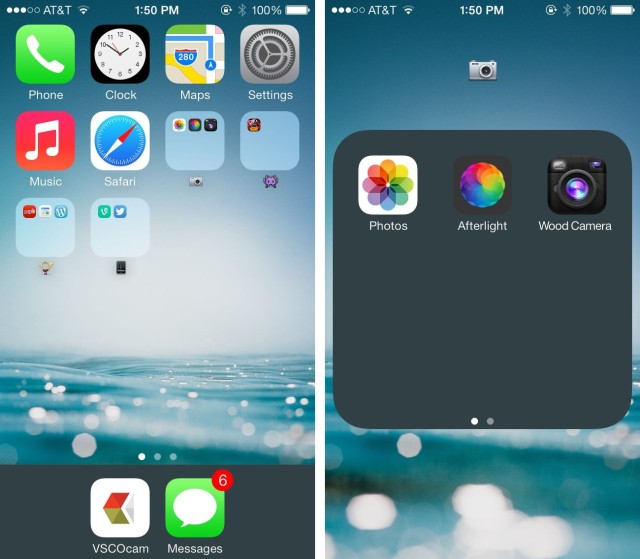
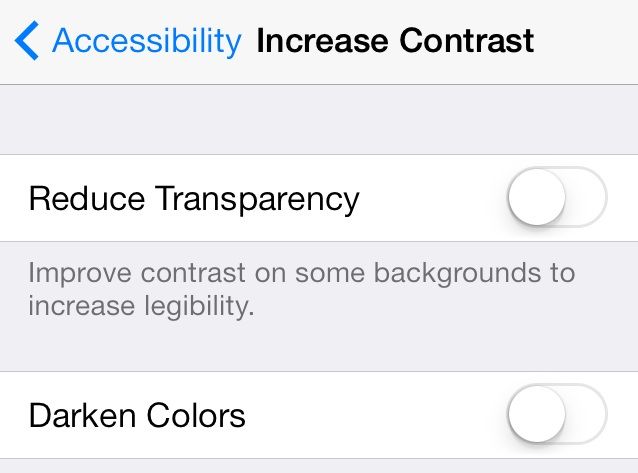
    Another new Accessibility option added to the iOS 7.1 beta essentially darkens the entire OS by giving users the options to Reduce Transparency, turning the dock and folder backgrounds a dark grey. You can choose to darken colors in iOS 7.1 too.


    Speaking of Accessibility enhancements, Apple also added controls that increase contrast throughout the UI. You can now choose to Reduce Transparency to improve contrast on some backgrounds so you can read text better. There’s also an option to darken colors if iOS 7 is just too damn bright.


    New HDR Auto Mode


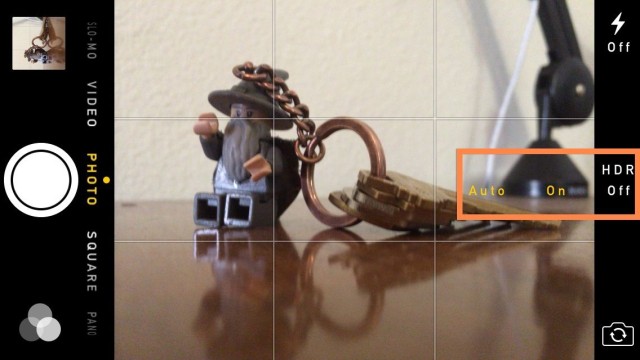
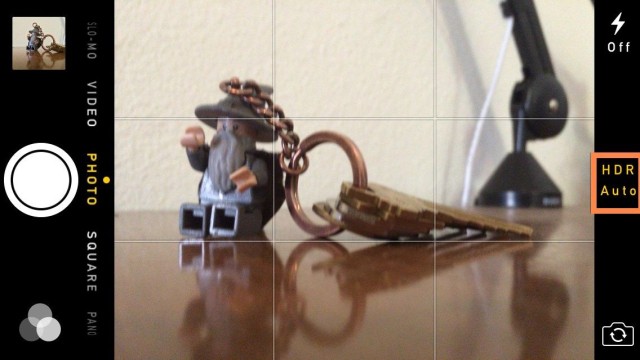
    Apple added a new HDR Auto mode to iOS 7.1 beta that automatically chooses the best photo from your HDR snap. You can toggle HDR Auto off by just switching to “HDR On” if you want the camera to save all 3 exposures to your camera roll with the option to expand and view each frame. The switching UI is a bit confusing at first, so hopefully Apple makes some improvements before final release.


    To switch back to regular HDR mode just tap the HDR button and choose “On” or “HDR Off”.


    Burst Photo Uploads

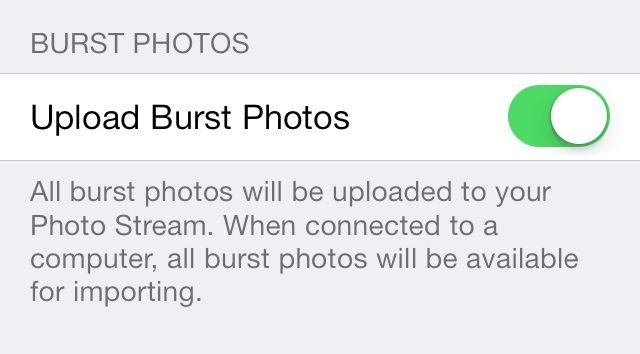
    Burst mode on the iPhone 5s is awesome for making sure you capture the perfect moment with a machine gun barrage of frames, but also those burst mode scenes eat up storage. Now you can choose whether or not to upload Burst Mode Photos to your PhotoStream.


    Yahoo Logo

    Yahoo’s logo has been updated throughout the operating system to reflect its new design:


    Flickr Gets More Minimal

    Flickr’s logo in the iOS 7.1 beta Settings has lost its gradient and app icon border, getting replaced with more minimalist white space to go with its blue and pick dots.


    • Read also: Video: A Handy Overview on Whats New in iOS 7.1


    Data source: CultofMac (By Buster Heine)

    Monday, May 18, 2015

    Apple Patent Describes Future Sapphire Glass Uses


    The U.S. Patent and Trademark Office this week published a patent application from Apple, reports AppleInsider. Entitled "Attachment Techniques". The application gives us insight into how the company may use Sapphire glass in the future, describes how sapphire may be securely fastened to an electronic device, and also gives insight as to how the material could be used to dissipate heat generated by a device.

    Sapphire could be used as a heat spreader

    The patent points out how difficult it is to attach sapphire to existing materials, and also notes the current implementation of sapphire as a cover for the rear camera on the iPhone. Apple suggests effective methods for using sapphire as a cover glass would involve creating an aperture within a sapphire substrate, then a heated second material with a lower melting point – metal or plastic – poured into the aperture. The next step would be to use the hardened and cooled material’s metallic portion as an attachment point to which other materials could be coupled.
    The aperture formed in the substrate may have one or more securing features to help hold the second material within the aperture. For example, the aperture may have one or more tapered sidewalls. Alternatively, or additionally, the aperture may have a notch or step in one or more sidewalls. In still other embodiments, an interior surface of the aperture may be threaded or include a lip or protrusion that serves as a securing feature. It should be appreciated that other securing features may be implemented and, further, that multiple securing features may be used in conjunction.
    Currently, Apple uses small pieces of sapphire glass to protect the iPhone’s cameras and the home button of the iPhone 5s, which features a fingerprint sensor.


    Sunday, May 17, 2015

    New Tests Point to Multiple Issues With iPhone 5s Sensors


    Reports of inaccurate motion sensors in the iPhone 5s continue to grow. As reported last week on Cult of Mac, there appear to be widespread problems with the 5s’ compass, gyroscope and accelerometer.


    The original forum thread at MacRumors is now at a whopping 19 pages of user reports, and Apple has yet to respond to Cult of Mac’s repeated requests for information.

    This morning, Gizmodo conducted its own tests and found the iPhone 5s motion sensors to be “totally screwed up.”

    Looks like the problem is far more widespread than the naysayers on our original post, and on the MacRumors thread, are willing to admit.

    While our unscientific tests last week showed that something was up with the compass component of the Cult of Mac iPhone 5s, the fine folks over at Gizmodo have put their iPhone 5s through a few more rigorous paces, posting pictures and video of just how inaccurate their iPhone’s results are across all the device’s motion sensors.

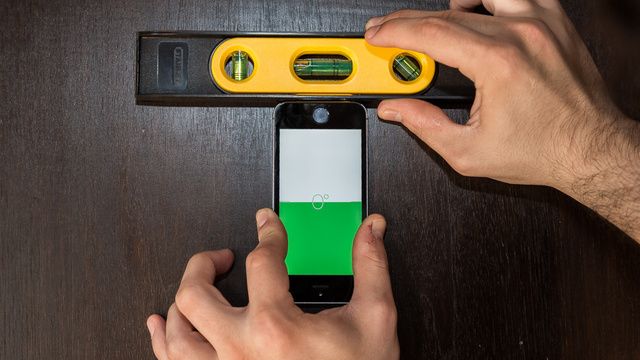
    They tested the level, comparing it to a real world bubble level, and using both Apple’s Level app as well as highly-regarded HandyLevel. They then tested the gyroscope with a racing game, finding that their in-game car drifted off to the left when the iPhone 5s was held level.

    The team then checked out the compass, comparing it to a real compass as well as that of the Compass app on an iPhone 4S, finding that readings tended to be off by as much as eight to ten degrees. “It’s also worth noting that on the iPhone 5S,” they wrote, “the compass application was prone to either freezing up or giving wonky readings that could only be fixed by killing and restarting the app.”

    This all points to the same potential cause, as pointed out in the MacRumors forum thread. The inconsistency of the problem, coupled with the fact that iPhone 5 devices with iOS 7 do not have the same problem, points to a hardware calibration issue.

    If Apple deals with this issue the same way it appears to be dealing with iPhone 5 “dust in the lens” issues, chances are that if you have a calibration issue, you’ll need to take it into an Apple Store and get a new iPhone 5s without the issue. It’s not likely that Apple will issue any sort of recall, as of yet.

    We’ll continue to follow the news around this motion sensor problem, and continue to try and get a response from Apple as well. Stay tuned.


    Data source: via CultofMac (By Rob LeFebvre ) [Gizmodo]

    Saturday, May 16, 2015

    Qualcomm Exec Soft Fired After Calling 64 Bit A7 Chip A “Gimmick”


    Last month, Qualcomm representative Anand Chandrasekher called Apple’s new 64-bit A7 chip a “gimmick.” It was a hugely stupid thing to say, leading to Qualcomm actually correcting Chandrasekher’s remarks. But it also might have killed Chandrasekher’s career, at least in part, as the former chief marketing officer seems to have been sent into exile within the company.

    In a statement to CNET, a Qualcomm representative said: “Anand Chandrasekher, is moving to a new role leading our exploration of certain enterprise related initiatives…Anand will continue to report to Steve Mollenkopf, COO and President of Qualcomm. This will be effective immediately.”

    This is corporate speak. Essentially, what Qualomm is saying is that Chandrasekher would have been fired for his remarks, but they can’t, so they’ve demoted him to some shitty position within the company until he resigns.

    Why is Qualcomm getting so bent out of shape about Chandrasekher’s comments? Essentially, because he threw his own company under the bus. 64-bit is the future of mobile ARM-based chips, and Qualcomm is going to start making the very type of chip that Chandrasekher just called a gimmick, probably within the next year. The former chief marketing officer had described the very technology Qualcomm’s future business would depend upon as not worth taking seriously.

    Chandrasekher’s job was to promote Qualcomm. Saying Qualcomm’s future chips are a “gimmick” is just completely inept. Qualcomm’s right: the guy should be fired.


    Data source: via CultofMac  (ByJohn Brownlee) [Cnet]

    Friday, May 15, 2015

    Pebble Opens Developer Portal Appstore Coming in 2014


    Pebble, the company behind the popular Pebble Smart Watch, today announced the opening of its new Pebble Developer Portal. With the Developer Portal open, Pebble app developers can upload apps that will be distributed in the company’s upcoming Pebble appstore, slated to launch in early 2014.

    The appstore, which will function similarly to other app repositories from companies like Apple and Google, will allow Pebble users to download an array of apps for their smart watches, from watch faces to more complex applications developed especially for the device.
    When it launches in early 2014, the Pebble appstore will be a first-of-its-kind wearable tech application directory—giving Pebble users a one-stop-shop for searching, browsing, and installing Pebble watch faces and apps directly from the iOS or Android Pebble smartphone app.
    Pebble’s Developer Portal comes after the November release of its Pebble SDK 2.0, which added four new APIs including Javascript, Accelerometer, Data Logging, and Persistent Storage. Pebble also recently gained support for iOS 7 notifications via the Pebble Smartwatch app, greatly enhancing the functionality of the device.

    The Pebble Smart watch can be purchased from the Pebble website for $150. The accompanying Pebble Smartwatch app can be downloaded from the App Store for free.


    Data source: via MacRumors (By Juli Clover)

    Thursday, May 14, 2015

    Apple investigating built in solar power converters for iPhone MacBook


    Apple already has a number of solar power inventions to its name, but Thursdays filing is one of the first to propose a solution that can be made viable in the near term.

    Source: USPTO

    As noted in the patent, titled "Power management systems for accepting adapter and solar power in electronic devices," Apple is not looking to invent a completely new solar power solution, as it has done in the past. Instead, the proposed method would take advantage of existing technologies and, more importantly, can be produced with currently available components.

    As electronics become more powerful with each successive generation, they in turn require more power, which for portables is limited by battery capacities. Apple notes these devices are therefore dependent on availability of mains electricity, or a wall outlet.

    There are solutions, such as solar panels, that can add extra juice on the go, but existing tech relies on external circuits to convert solar panel power to a form compatible with electronic devices. More specifically, iPhones and MacBooks accept specific direct current (DC) voltages. While an option, integrated solar panels have proven bulky and the aesthetics may be less than desirable for Apple.


    According to the filing, the integrated power management system would include a system micro controller (SMC) and a charger. Power would flow to the system from either an AC-to-DC adapter or directly from a photovoltaic solar panels output, which is DC only, then be measured and converted to the necessary voltage.

    In this embodiment, chargers power stage incorporates what is known as a buck converter, or step-down DC-to-DC converter. Incoming power is monitored by a charger IC, converted to an appropriate voltage and fed into either an input current loop, a battery current loop, an output voltage loop, or an input voltage loop to control charging.

    The SMC monitors system power metrics like battery charge, health and input power type, among others, and manages the power stage accordingly.

    In the case of solar power input, the SMC would track a maximum power point for the panels by any number of methods, including multiplying current with voltage. Once this point is established, SMC sends a signal to the charger IC, which uses the data to adjust a reference voltage for maximum power point tracking (MPPT). This point determines what voltage changes need to be applied to the solar panel input.

    Finally, Apple notes that the power management system can accept both solar and mains power simultaneously.

    Illustration of power management system with incorporated MPPT.

    All processing and adjustments can be accomplished with established techniques and deployed in a reasonably small component package, making the invention suitable for use in iPhones and MacBooks. While solar tech is somewhat of a rarity, the alternative energy solution is becoming more popular with mainstream consumers looking for on-the-go power.

    Apples solar power converter patent application was first filed for in 2012 and credits Kisun Lee, Manisha P. Pandya and Shimon Elkayam as its inventors.


    Data source: via AppleInsider (By Mikey Campbell)
    Image source: TC